CannonBowling: Strike Action
- 4.6
- Rating
- 5.00M
- Installs
- Free
- Price

 Analysis by App-foxy
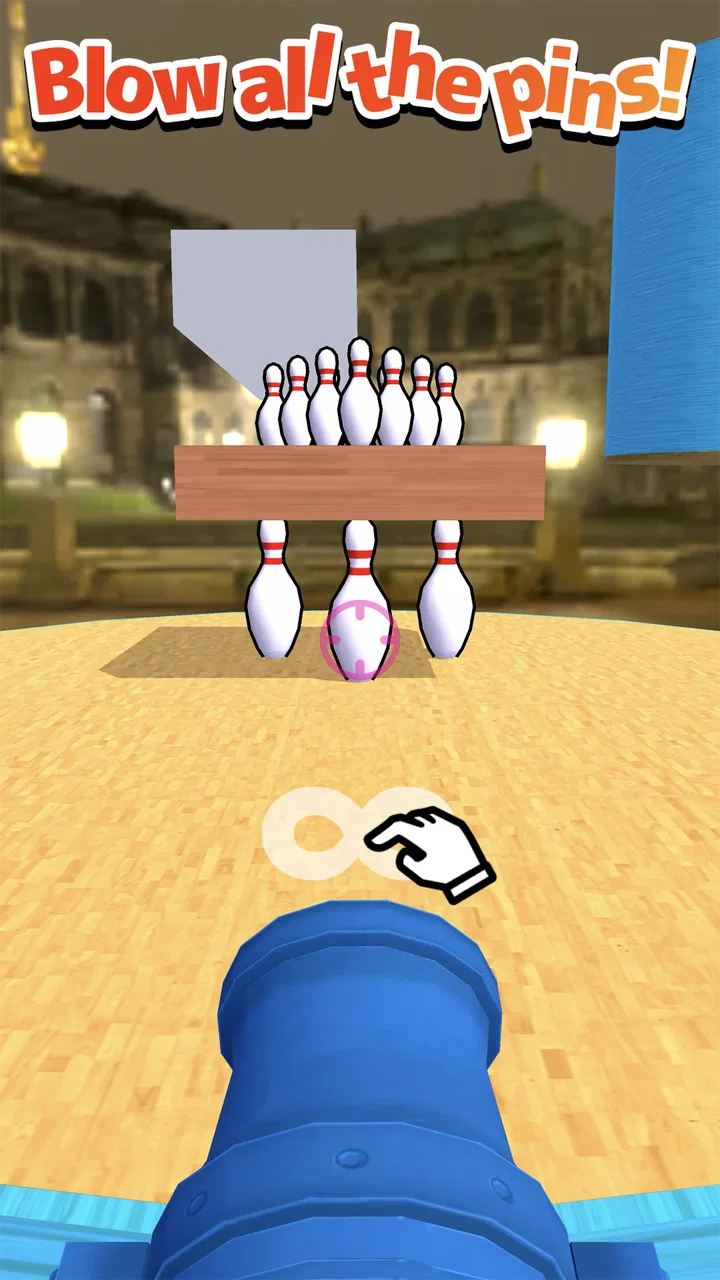
I picked up CannonBowling: Strike Action expecting a quick arcade distraction, and that is exactly where it makes sense. The central idea is simple: instead of rolling a bowling ball down a conventional lane, I launch it with cannon-like action and try to send it into the pins. That small change gives the familiar bowling target a more playful, immediate feel. It is easy to understand within seconds, but getting a satisfying result still depends on timing, aim, and learning how the game responds to each shot.
That makes it a useful candidate for a shared phone or tablet in a household. Someone can play for a minute while waiting, hand the device to another person, and return to it later without needing a long explanation. I would not treat it as a complete replacement for a full bowling game, though. Its appeal comes from quick arcade interaction rather than detailed simulation, deep competition, or a long story. If you want a focused little challenge built around firing a bowling ball, it has a clear identity.
How CannonBowling fits into everyday shared play
When I think about shared play, the useful question is less who can get the highest score and more how to keep the turns relaxed when several people are waiting. I’d agree on a simple shot limit before handing over the device, so each person gets a fair chance without turning a quick game into a dispute over whose turn it is. That little bit of structure also makes it easier to notice what each player is learning from a shot.
You May Also Like

 Blood Strike: 2.5 Anniversary
Blood Strike’s Loadouts Turn Every Drop Into a Tactical Gamble
A close look at Blood Strike’s custom loadouts: how fast access to signature weapons reshapes its battle royale rhythm, rewards preparation, and narrows the gap between fights.

 Pandora - Music & Podcasts
Pandora’s Music Is Easy to Start, but Harder to Recover
Pandora’s strength is its low-effort path from a seed to a station. Its weak spot is how much confidence it asks you to place in connection, setup, and quiet recovery.

 8 Ball Pool
 Is Built on Rivalries, Rematches, and Routine
A close look at the rivalries, rematches, shared routines, and unanswered safety questions that turn a quick pool match into a persistent mobile community.

 Samsung Music
’s Quiet Strength Is Playing What You Already Own
Its reach comes less from spectacle than from dependable access to a personal library. That simplicity is both the app’s strongest retention engine and its ceiling.

 AccuWeather: Weather Radar
AccuWeather Review: A Quick, Clear Forecast for Everyday Decisions
For everyday plans, the best forecast is the one you can understand quickly. AccuWeather makes rain timing, radar, and local conditions easy to act on, with a few trade-offs.

 Hill Climb Racing
Why Hill Climb Racing Still Turns Crashes Into One More Run
A tiny car, a bumpy hill and one more upgrade: Hill Climb Racing keeps resurfacing because its simple chaos makes every near-miss feel personal.
More From Our News Desk



A game that works well in short household turns
In my experience, the best way to use this game is in small bursts. Imagine a family sitting together after dinner with one device on the table. One person takes a shot, another immediately tries to beat the result, and the device goes back and forth without anyone needing to learn a complicated control scheme. The game’s bowling theme gives everyone an obvious goal, while the cannon-style presentation keeps the action lighter than a traditional bowling simulator.
That shared-device scenario also reveals an important strength: the game is spectator-friendly. A person who is not holding the phone can understand what is happening simply by watching the launch and the pins. This is different from many arcade games where the action is too fast or the rules are hidden behind several menus. Here, the result of a turn is visible, so casual coordination is natural: “try a little more to the side” or “use less force” becomes useful advice rather than random commentary.
I would still set expectations before passing the device around. This is not the same as a structured multiplayer bowling session with clearly separated player profiles, detailed score history, or a formal tournament setup. The shared experience depends on the people using it to organize their own turns. That can be a positive because there is very little administration, but it also means the game is better for informal competition than for tracking a serious household league.
Why the simple premise has more depth than it first appears
The first shot is easy to understand, but repeating the same action does not make every attempt identical. Small changes in angle, release timing, or force can alter the result, and that gives the game a useful learning curve without making it feel like homework. I found myself paying attention to the relationship between the starting position and the final path rather than simply tapping as quickly as possible.
One practical tip is to resist the temptation to change several things at once. When a shot misses, I get more useful feedback by adjusting one element on the next attempt. If I move the aim and alter the strength together, I cannot tell which decision helped. That sounds obvious, but it is the kind of small habit that turns a random arcade session into a more satisfying skill exercise.
Another useful approach is to treat early attempts as calibration rather than failures. The bowling theme encourages me to think in terms of where the ball should finish, while the arcade format rewards quick experimentation. On a shared device, this also helps younger or less experienced players: they can try an adjustment, observe the result, and understand the game through action instead of receiving a long tutorial.
Setup boundaries on Android
The game is free, and it is listed for Android devices running version 6.0 or later. That gives it a broad technical starting point for people using older compatible phones or tablets, although the experience will naturally depend on the particular device. I would install it on the device that will actually be shared rather than assuming that a larger screen or newer model is automatically necessary. The important question is whether the controls feel comfortable in the hands of the intended players.
For a household device, I recommend creating a simple routine before playing. Decide who gets the first turn, whether everyone gets the same number of attempts, and whether the winner is based on one result or a short sequence of turns. These rules are not supplied by the game itself; they are a practical way to give the quick arcade format more structure. Without them, the person holding the device last may simply keep playing until everyone else loses interest.
It is also worth separating the game’s setup from the household’s account arrangements. A shared device may already be used by several people for different purposes, so I would avoid assuming that the game should represent everyone’s individual progress. If a parent, partner, or sibling wants a personal record, using a separate device may be less confusing than trying to remember who achieved which result. The game is easy to pass around, but that does not automatically create separate player identities.
That boundary matters because short arcade games often encourage “just one more try.” On a personal phone, that is harmless. On a device used by several people, it can quietly turn into one person occupying the screen for much longer than intended. A timer, turn count, or simple verbal agreement can keep the session friendly. I found that this kind of coordination improves the experience more than searching for complexity that the game does not need.
Coordinating turns without making the game feel formal
The most natural household format is a rotating challenge. Each player gets a fixed number of shots, and someone keeps the score verbally or on paper. This works especially well because the core action is compact: a player does not need to hand over the device in the middle of a long level. The next person can begin almost immediately after the result is visible.
For younger players, I would make the first round about learning rather than winning. Let them experiment with aiming and strength, then use the second round for comparison. That avoids the common problem where an unfamiliar control feels unfair simply because an experienced player already understands how to compensate. The game’s straightforward premise gives adults a good opportunity to coach without taking control away from the child.
For adults or older children, a more interesting variation is to choose a target before each shot. One player can call for a conservative attempt aimed at a reliable hit, while another can try a riskier angle in search of a better result. This creates a decision-making layer around the same basic control. It does not require extra features, accounts, or a formal multiplayer mode; the group supplies the challenge.
There is a trade-off here. Because the game is designed as an arcade experience, it is excellent at producing quick attempts but less suited to a complicated scoring ceremony. If your household wants detailed statistics, long-term rankings, or a persistent competition between separate players, a dedicated bowling game may be a better choice. CannonBowling is strongest when the goal is immediate play, not record keeping.
Age context and trust when sharing the device
The content rating is Teen, so I would not automatically hand the game to very young children without checking whether it suits the family’s standards and the child’s maturity. The bowling-and-cannon concept sounds playful, but an age label should still be treated as useful context rather than ignored because the game looks simple. Parents can make that decision based on the child, the device, and the way the game will be used.
For teenagers, the game may work nicely as a low-pressure break. It does not demand the commitment of a long role-playing session, and the basic objective is easy to explain to a friend. It can also support friendly competition without requiring personal information from everyone in the room. Still, I would avoid presenting it as a substitute for supervised family interaction. The game can bring people around one screen, but the quality of that interaction comes from how the household sets boundaries and treats the result.
Trust also means being clear about ownership of the device and progress. If several people play on one phone, a strong score may not belong clearly to one person unless the group records it. That is not a flaw in the shot mechanic, but it is a real consideration for shared use. I prefer treating the game as a communal activity on a household tablet and as a personal quick-play title on my phone, because those two situations have different expectations.
The developer is KAYAC Inc., and the game has built a visible audience, with an average rating of 4.6 from around 24 thousand ratings and more than 5 million installs. Those figures suggest that the basic idea has broad appeal, but they do not change the practical question of fit. A popular arcade game can still be the wrong choice for someone who wants realistic bowling physics, a deep progression system, or carefully separated family accounts.
What the current version means for a practical user
The current version is 1.2.4, and the game was released on December 21, 2022. I mention those details because they help place the experience: this is an established arcade title rather than a brand-new experiment that a household must adopt before knowing whether the concept works. At the same time, I would keep expectations focused on the core activity. The appeal is the shot itself, not a promise of a large simulation package.
When I evaluate a game like this for a shared device, I look for three things: can a new player understand it quickly, can a returning player improve, and can the group end a session without confusion? CannonBowling performs well on the first two. The third depends on the household’s own rules because the game’s quick-play nature makes it easy to continue indefinitely. That is a manageable limitation, but it is worth acknowledging before installing it for several people.
A further trade-off is attention span. The compact arcade loop is convenient when I have only a few minutes, yet it may feel thin if I want a longer evening activity. I would choose it for a queue, a break, or a casual challenge between chores. I would choose a fuller bowling title instead when I want a realistic lane, more elaborate match structure, or a stronger sense of progression. The comparison is not about which genre is better; it is about whether I want exaggerated arcade timing or traditional bowling detail.
Who should choose it, and who should skip it
I would recommend it to players who enjoy simple physics-style challenges, quick retries, and games that can be explained while already playing. It is particularly suitable for a shared household screen where people want to take turns without committing to a long session. The bowling target makes it approachable, while the cannon launch gives it enough personality to avoid feeling like an ordinary digital scorecard.
I would be more cautious about recommending it to someone who needs robust solo progression. If your ideal game includes extensive customization, a campaign, detailed player statistics, or a carefully managed online competition, this is probably too focused. The same applies to serious bowling fans who want the feel of lane conditions, ball selection, and realistic technique. This game turns bowling into an arcade action rather than trying to reproduce the sport in full.
It may also be a poor fit for a household that expects every family member to have a clearly isolated profile. Passing a device around is easy, but separate identities and personal records require the users to manage that distinction themselves. In that situation, a game built around individual accounts or a more explicit local multiplayer structure would be more convenient.
My household verdict
After spending time with it, I see CannonBowling: Strike Action as a compact shared-play game with a clear reason to exist. It takes the recognizable goal of knocking down pins and gives the shot a more immediate arcade character. I like that I can understand the objective quickly, experiment with my aim, and invite someone else to try without turning the room into a tutorial session.
Its best use is a short, informal challenge on a device that people are comfortable passing around. Set a turn order, agree on how many shots each person gets, and decide whether the session is about learning or winning. Those small choices solve most of the friction that comes from using a quick arcade game communally. They also prevent the familiar “one last attempt” cycle from taking over the entire evening.
The free price removes the biggest barrier to trying it, while the Teen rating gives families a reason to make an intentional age decision instead of assuming that a bowling theme is automatically suitable for everyone. With its 4.6 average and audience of over 5 million installs, it is clearly not an obscure concept, but popularity should be treated as a starting point rather than a guarantee that it will match every player.
My final recommendation is straightforward: choose it if you want fast, readable bowling-inspired arcade action and a game that can support friendly turns on one screen. Skip it if you are looking for a full bowling simulator, deep long-term progression, or built-in separation between household players. Its real strength is the immediacy of the shot, not the size of the surrounding feature set. For the right kind of short session, that focus is exactly what makes it enjoyable.
There are around 505 reviews alongside the broader rating activity, and that gives the game a substantial public footprint without changing my central conclusion. I would install it for a quick personal break or keep it available on a shared tablet for informal family challenges. I would not make it the only game in a household’s library, but as a focused arcade option, it earns its place.
FAQs for CannonBowling: Strike Action
01What is CannonBowling: Strike Action?
CannonBowling: Strike Action is an innovative mobile game that combines classic bowling with cannon shooting mechanics. Players aim and fire a cannon to knock down pins, offering a fresh twist on traditional bowling games. With engaging graphics and dynamic gameplay, it's available for both Android and iOS platforms.
02How do you play CannonBowling: Strike Action?
In CannonBowling: Strike Action, players use a virtual cannon to shoot bowling balls at pins. The objective is to knock down as many pins as possible with limited shots. The game features various levels and challenges, requiring strategic aiming and timing to achieve high scores and unlock new stages.
03What are the main features of CannonBowling: Strike Action?
CannonBowling: Strike Action offers multiple game modes, including single-player challenges and competitive multiplayer. It features a variety of cannon types and ball designs, each affecting gameplay differently. The game also includes leaderboards, achievements, and regular events to keep players engaged and competing globally.
04Is CannonBowling: Strike Action free to play?
Yes, CannonBowling: Strike Action is free to download and play. However, it offers in-app purchases for players who wish to enhance their gaming experience. These purchases can include special cannon upgrades, exclusive ball designs, and ad-free gameplay options, allowing for a more personalized experience.
05Does CannonBowling: Strike Action require an internet connection?
While CannonBowling: Strike Action can be played offline in single-player mode, an internet connection is necessary for accessing multiplayer features and participating in global leaderboards and events. Playing online also allows users to receive game updates and new content releases regularly.
Pros
- Engaging and addictive gameplay.
- User-friendly interface for all ages.
- Vibrant graphics enhance experience.
- Regular updates with new levels.
- Offline play mode available.
Cons
- Occasional in-app purchase prompts.
- Ads can be slightly intrusive.
- Limited multiplayer options.
- Some levels repeat in difficulty.
- Requires moderate device storage.

CannonBowling: Strike Action
Gallery